> For the complete documentation index, see [llms.txt](https://docs.deltaquad.com/gov/llms.txt). Markdown versions of documentation pages are available by appending `.md` to page URLs; this page is available as [Markdown](https://docs.deltaquad.com/gov/maintenance/pitot-tube.md).
# Pitot Tube
This section describes the necessary steps to take after flying in the rain.
{% hint style="info" %}
The **Pitot tube** is critical to an aircraft's airspeed measurement system. It is a small, forward-facing tube that measures the dynamic pressure of the air as the vehicle moves through it. This pressure is then used to calculate the vehicle's airspeed. The DeltaQuad Evo's Pitot tube is located on the aircraft's nose, where it can capture undisturbed airflow. Proper functioning of the Pitot tube is essential for accurate airspeed readings, which are crucial for safe flight operations.
{% endhint %}
{% hint style="warning" %}
As stated in the [**Pre-flight Checks**](/gov/flight/pre-flight-checks.md), after flying in the rain, the vehicle must be removed from the flight case and stored in a dry space for at least 24 hours before the next flight. This ensures that all internal tubing and the external part of the Pitot tube are completely dry.
{% endhint %}
To expedite this process, the following steps can be taken:
1. After flying in the rain, place the vehicle **nose down** and put a **fan** on the pitot tube to dry it out.
2. Verify its functioning by switching the vehicle on and having a fan blow on the pitot tube. The airspeed should display a positive value that corresponds to the amount of airflow.
3. A visual inspection can be done of the transparent tubes to verify there is no buildup of water.
4. If the tubes are ever disconnected, they should be **labeled**, as reversing the tubes would be detrimental.
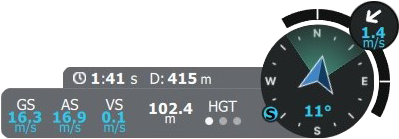
5. If there is an airspeed error due to water, this will show during the front transition after the VTOL takeoff. The standard timeout is 60 seconds, which will bring the vehicle quite far (approximately 800m). During the transition, the pilot can monitor the airspeed to ensure it is increasing as the vehicle begins the front transition. The airspeed is displayed in the [**Telemetry Dashboard**](/gov/flight/auterion-mission-control-amc-overview/amc-menu/fly-view.md#telemetry-dashboard), in the lower right corner of the Fly View. **AS** displays the airspeed.
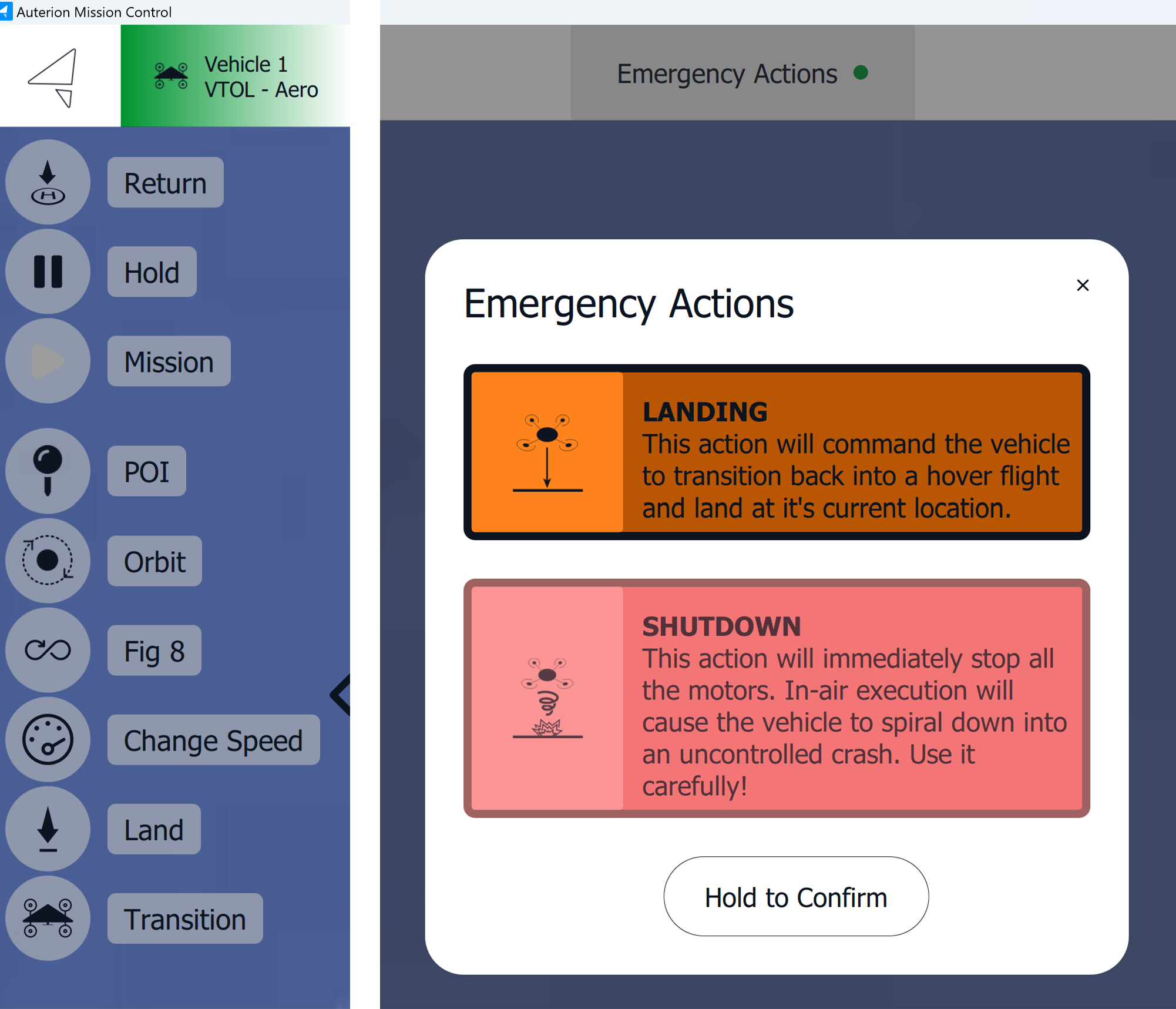
If the airspeed is not increasing or displays an error, the pilot should issue the [**Land**](/gov/flight/auterion-mission-control-amc-overview/amc-menu/fly-view.md#flight-tools) command. The takeoff site should be suitable for this. Alternatively, the land command can also be given in the [**Emergency Action**](/gov/flight/executing-and-monitoring-a-mission/controlling-the-vehicle.md) tab.
---
# Agent Instructions
This documentation is published with GitBook. GitBook is the documentation platform designed so that both humans and AI agents can read, navigate, and reason over technical content effectively. Learn more at gitbook.com.
## Querying This Documentation
If you need additional information that is not directly available in this page, you can query the documentation by asking a question.
Perform an HTTP GET request on the following URL with the `ask` and `goal` query parameters:
```
GET https://docs.deltaquad.com/gov/maintenance/pitot-tube.md?ask=&goal=
```
`ask` is the immediate question: it should be specific, self-contained, and written in natural language.
`goal` is what the user is ultimately trying to achieve, the reason they need the answer. Sharing it helps GitBook give you a better, more relevant answer. A goal is most helpful when it describes the outcome the user wants rather than restating the question. For example, with `ask=how do I create an API token`, a goal like `automate deployments from our CI pipeline` lets GitBook tailor the answer to that use case.
The response will contain a direct answer to the question and relevant excerpts and sources from the documentation.
Use this mechanism when the answer is not explicitly present in the current page, you need clarification or additional context, or you want to retrieve related documentation sections.

.webp)